Broadcast compliance recording and live video conversion

Record, review, and convert broadcast feeds with GPU-accelerated software on standard server hardware.

Broadcast software expertise since 2009. Broadcast and live video software for TV stations, teleports, streaming services, media organisations, houses of worship and healthcare providers.

NVIDIA Inception Program member
SyncWIZ professional sixteen-channel recording interface illustrationStatic editable illustration based on the supplied SyncRecorder application references. Charcoal desktop interface with synchronized recording controls, Sources and Destinations sidebars and sixteen channel previews in a four-by-four multiview. Each channel has separate recording indicator, REC HH:MM:SS duration, FPS, input type and illustrative stereo audio meters. Values and in-sync statuses are illustrative, not live measurements. This is a stylized product illustration, not an unaltered screenshot. On the Tricube homepage the recording indicators, durations and audio meters are animated for illustration. Imagery is embedded raster; interface text and controls are vector elements.SyncWIZSyncRecorderSynchronized channels16-channel viewSources16 inputs01 NewsSDI · 25 FPS02 Live sportsSRT · 30 FPS03 Live musicNDI · 50 FPS04 ConferenceIP/UDP · 25 FPS05 WeatherSDI · 30 FPS06 CulinarySRT · 25 FPS07 WildlifeNDI · 50 FPS08 EducationIP/UDP · 30 FPS09 WorshipSDI · 25 FPS10 HealthcareSRT · 50 FPS11 City cameraNDI · 30 FPS12 BusinessIP/UDP · 25 FPS13 InterviewSDI · 50 FPS14 NatureSRT · 25 FPS15 TravelNDI · 30 FPS16 MotorsportIP/UDP · 50 FPSAdd sourceDestinations16 outputsCH 01Encoding preset #1CH 02Encoding preset #1CH 03Encoding preset #1CH 04Encoding preset #1CH 05Encoding preset #1CH 06Encoding preset #1CH 07Encoding preset #1CH 08Encoding preset #1CH 09Encoding preset #1CH 10Encoding preset #1CH 11Encoding preset #1CH 12Encoding preset #1CH 13Encoding preset #1CH 14Encoding preset #1CH 15Encoding preset #1CH 16Encoding preset #1Preset settingsMultiview4 × 4CH 01 News, REC 01:24:00, 25 FPS, SDI input; illustrative valuesCH 01NewsSDIREC 01:24:0025 FPSIn SyncLRCH 02 Live sports, REC 01:24:00, 30 FPS, SRT input; illustrative valuesCH 02Live sportsSRTREC 01:24:0030 FPSIn SyncLRCH 03 Live music, REC 01:24:00, 50 FPS, NDI input; illustrative valuesCH 03Live musicNDIREC 01:24:0050 FPSIn SyncLRCH 04 Conference, REC 01:24:00, 25 FPS, IP/UDP input; illustrative valuesCH 04ConferenceIP/UDPREC 01:24:0025 FPSIn SyncLRCH 05 Weather, REC 01:24:00, 30 FPS, SDI input; illustrative valuesCH 05WeatherSDIREC 01:24:0030 FPSIn SyncLRCH 06 Culinary, REC 01:24:00, 25 FPS, SRT input; illustrative valuesCH 06CulinarySRTREC 01:24:0025 FPSIn SyncLRCH 07 Wildlife, REC 01:24:00, 50 FPS, NDI input; illustrative valuesCH 07WildlifeNDIREC 01:24:0050 FPSIn SyncLRCH 08 Education, REC 01:24:00, 30 FPS, IP/UDP input; illustrative valuesCH 08EducationIP/UDPREC 01:24:0030 FPSIn SyncLRCH 09 Worship, REC 01:24:00, 25 FPS, SDI input; illustrative valuesCH 09WorshipSDIREC 01:24:0025 FPSIn SyncLRCH 10 Healthcare, REC 01:24:00, 50 FPS, SRT input; illustrative valuesCH 10HealthcareSRTREC 01:24:0050 FPSIn SyncLRCH 11 City camera, REC 01:24:00, 30 FPS, NDI input; illustrative valuesCH 11City cameraNDIREC 01:24:0030 FPSIn SyncLRCH 12 Business, REC 01:24:00, 25 FPS, IP/UDP input; illustrative valuesCH 12BusinessIP/UDPREC 01:24:0025 FPSIn SyncLRCH 13 Interview, REC 01:24:00, 50 FPS, SDI input; illustrative valuesCH 13InterviewSDIREC 01:24:0050 FPSIn SyncLRCH 14 Nature, REC 01:24:00, 25 FPS, SRT input; illustrative valuesCH 14NatureSRTREC 01:24:0025 FPSIn SyncLRCH 15 Travel, REC 01:24:00, 30 FPS, NDI input; illustrative valuesCH 15TravelNDIREC 01:24:0030 FPSIn SyncLRCH 16 Motorsport, REC 01:24:00, 50 FPS, IP/UDP input; illustrative valuesCH 16MotorsportIP/UDPREC 01:24:0050 FPSIn SyncLRSynchronized recordingSources 16Destinations 1616 channelsSyncRecorder{"illustrative":true,"channels":[{"channel":"01","name":"News","fps":25,"input":"SDI","startSeconds":5040},{"channel":"02","name":"Live sports","fps":30,"input":"SRT","startSeconds":5040},{"channel":"03","name":"Live music","fps":50,"input":"NDI","startSeconds":5040},{"channel":"04","name":"Conference","fps":25,"input":"IP/UDP","startSeconds":5040},{"channel":"05","name":"Weather","fps":30,"input":"SDI","startSeconds":5040},{"channel":"06","name":"Culinary","fps":25,"input":"SRT","startSeconds":5040},{"channel":"07","name":"Wildlife","fps":50,"input":"NDI","startSeconds":5040},{"channel":"08","name":"Education","fps":30,"input":"IP/UDP","startSeconds":5040},{"channel":"09","name":"Worship","fps":25,"input":"SDI","startSeconds":5040},{"channel":"10","name":"Healthcare","fps":50,"input":"SRT","startSeconds":5040},{"channel":"11","name":"City camera","fps":30,"input":"NDI","startSeconds":5040},{"channel":"12","name":"Business","fps":25,"input":"IP/UDP","startSeconds":5040},{"channel":"13","name":"Interview","fps":50,"input":"SDI","startSeconds":5040},{"channel":"14","name":"Nature","fps":25,"input":"SRT","startSeconds":5040},{"channel":"15","name":"Travel","fps":30,"input":"NDI","startSeconds":5040},{"channel":"16","name":"Motorsport","fps":50,"input":"IP/UDP","startSeconds":5040}],"layout":{"columns":4,"rows":4},"animationIncluded":false,"references":["MAIN UI_5.PNG","MAIN UI_2.PNG"]}

SyncWIZBroadcast recording and review

Know what went on air. Find it, review it, export it.

For TV stations, streaming services and media regulators that keep a broadcast archive for compliance checks and content review.

  • Record everything, with the time in the picture. Broadcast and streaming channels are recorded continuously, with the timestamp embedded in every frame. If a recording has a gap, you see the gap. Nothing is filled in.
  • Find the footage from your browser. Locate recordings by channel, day and time, and play them in the browser on your network. Nothing to install on the reviewer’s PC.
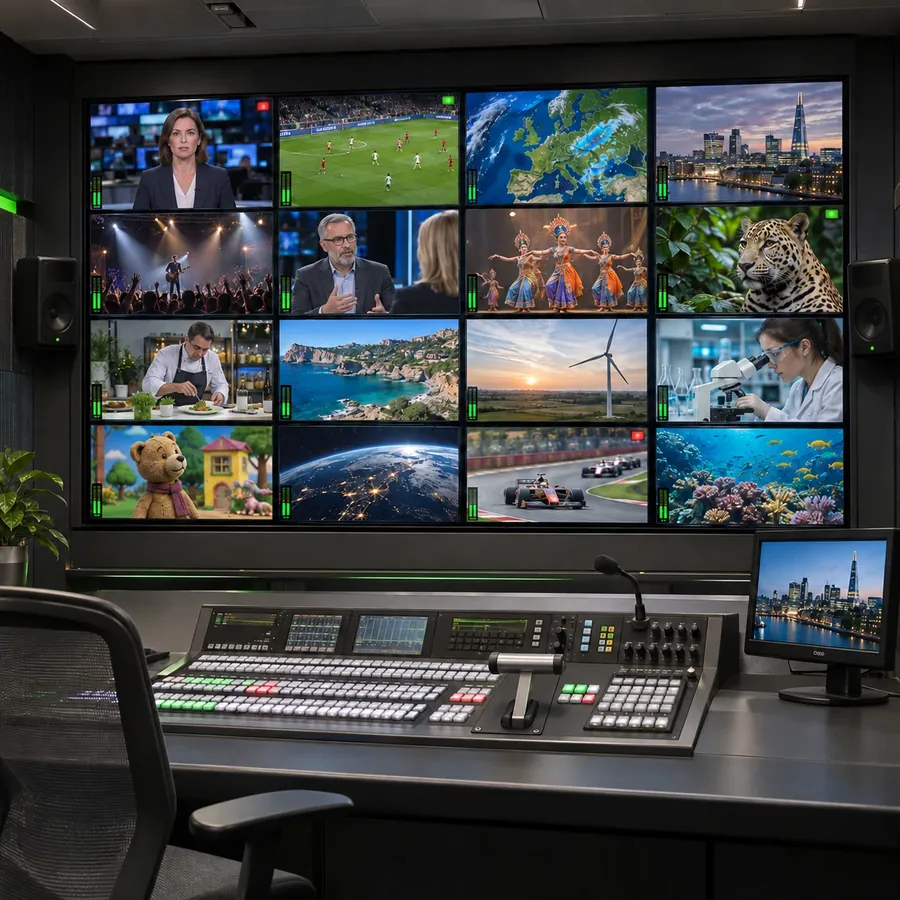
  • Review channels side by side. Up to sixteen channels on one synchronised timeline, so you see what every channel showed at the same moment. Each reviewer works in their own session without disturbing anyone else.
  • Export what you found. Clips carry the channel, date and time in their name, cut at the recorded times, ready to attach to a report.
  • Give people the right access. Viewers review, editors export, administrators manage. Every action is logged.
BridgeWIZ live video conversion workflow Conceptual product illustration. ST 2110, SRT, NDI, HLS, Web browser, SDI and HDMI inputs, plus Scan conversion capture, connect to BridgeWIZ. Processing includes format conversion, the HTML Graphics Overlay Engine, HD and UHD upscaling and downscaling, and resolution and frame rate conversion. Outputs shown are ST 2110, NDI, SRT, SDI, RTMP and UDP, plus ISO Recording. The same illustrative football scene is shown across outputs to convey a shared source. This is not a screenshot of the application or an exhaustive compatibility matrix. INPUTS PROCESSING OUTPUTS ST 2110 SRT NDI HLS Web browser SDI HDMI CAPTURE Scan conversion BridgeWIZ Format conversion HTML Graphics Overlay Engine Resolution & FPS HD UHD Upscale / downscale ST 2110 NDI SRT SDI RTMP UDP RECORDING ISO Recording

BridgeWIZDecoder, scan converter and live video gateway

Bring live feeds, screens and video calls into production.

For broadcasters, production studios and AV teams that need to connect incoming streams, desktop content and broadcast equipment.

  • Decode incoming live feeds. Bring supported IP streams into your SDI or NDI production workflow.
  • Turn your screen into a video source. Capture a desktop, application window or selected area to include presentations and video calls in your production.
  • Convert, deliver and record together. Send video to multiple outputs, add live graphics and record individual sources through one software platform.

CGWIZBroadcast graphics

Live broadcast graphics, designed in the browser and played to air from anywhere.

For television channels of every size, cable operators, and live event and sports producers.

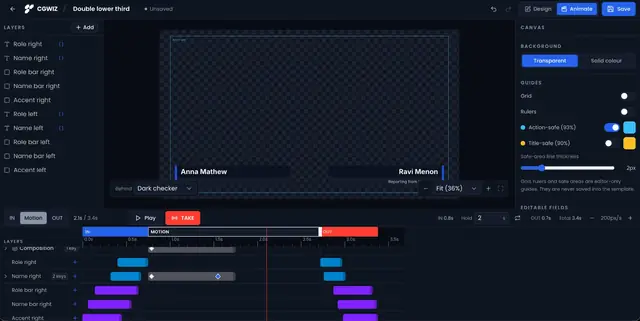
  • Design in the browser. Build lower thirds, crawls, tickers, bugs and full-frame graphics with animation presets, keyframes and a timeline.
  • Live data. Bind text to a Google Sheet, CSV, XML, RSS or JSON feed or a manual table. On-air text updates without replaying the animation.
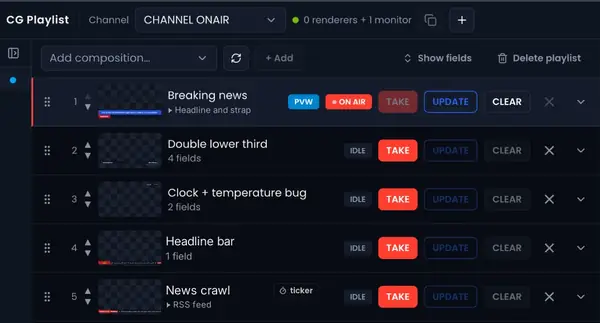
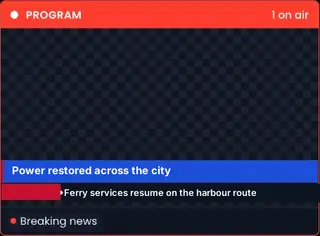
  • Operate from CG Playlist. A desk with Preview and Program monitors, a rundown and one-key TAKE, UPDATE and CLEAR.
  • Output anywhere. A transparent Render URL for OBS, vMix, CasparCG, TriCaster or any browser source. Tricube Render Engines takes it to SDI and NDI.

Trusted by TV stations, IPTV and OTT providers, and satellite teleport operators.

How it works

See how Tricube fits your workflow

Explore the steps behind broadcast recording, browser review and live video conversion.

From live channels to clips ready for your report.

  1. CH 1REC29 Oct 14:32:08CH 2REC29 Oct 14:32:08CH 3REC29 Oct 14:32:08CH 4REC29 Oct 14:32:08

    1Record

    Record with timestamps

    Capture supported broadcast and streaming channels continuously, with the date and time embedded in the video.

  2. Browser reviewFind recordingsChannelCH 1 to 4Date29 OctTime14:30Search4 recordings foundCH 129 Oct14:30 to 15:00CH 229 Oct14:30 to 15:00CH 329 Oct14:30 to 15:00CH 429 Oct14:30 to 15:00CH 1CH 2CH 3CH 414:3015:00

    2Review

    Find and review recordings

    Search by channel, date and time. Review up to 16 channels on a synchronised timeline in your browser.

  3. CH 2 · 29 Oct14:32 to 14:35Included in the file nameChannelDateTime

    3Export

    Export clips for your report

    Export selected footage with the channel, date and time included in the filename.

Role-based access for viewing, exporting and administration, with activity logs for oversight.

Explore SyncWIZ

FAQs

What is the difference between SyncWIZ and BridgeWIZ?

SyncWIZ records and archives channels for compliance checks and content review. BridgeWIZ converts live video, captures screen content, adds graphics and sends video to multiple outputs. Choose according to your recording or live-production requirements.

What is broadcast compliance recording?

Broadcast compliance recording creates a timestamped archive of what aired. Teams use these recordings to investigate complaints, review content and retrieve footage for compliance checks.

Which sources can SyncWIZ record?

SyncWIZ records supported SDI, NDI, SRT, HLS and SMPTE ST 2110 sources, as well as web pages and YouTube Live. Check the supported-source specifications for compatibility and hardware requirements.

How many channels can SyncWIZ record and review?

SyncWIZ recording deployments start at 16 channels and can expand through additional instances. Recording capacity depends on the server, source formats, recording settings and licence. SyncPlayer Web supports synchronised review of up to 16 channels at a time.

Can my team review recordings in a browser?

Yes. SyncPlayer Web lets authorised users find and review recordings through a supported web browser, without installing playback software on each reviewer’s computer.

Can BridgeWIZ replace hardware encoder and decoder boxes?

BridgeWIZ can consolidate supported encoding, decoding and conversion workflows on a GPU workstation or server. The required hardware depends on your sources and outputs. SDI connections still require compatible video I/O hardware.

Get started

Book a demo with our engineers

See how SyncWIZ or BridgeWIZ fits your workflow. Discuss your sources, protocols and channel requirements with the engineers behind the software.