
Starter
1channel
- Layers per channel3
- Playlists per channel3
- Tricube Render EnginesNo

CGWIZ is a browser-based broadcast graphics platform. Design animated lower thirds, tickers and data-driven graphics, run them from a playlist desk, and output transparent graphics to OBS, vMix or SDI.
With BridgeWIZ
BridgeWIZ renders the CGWIZ HTML overlay on a transparent background and outputs it as separate key and fill, the way professional graphics systems feed a DSK or vision mixer.
BridgeWIZ takes a live input, adds the CGWIZ HTML overlay and outputs the finished picture to SDI, NDI, SRT or RTMP.
Unlimited possibilities for news, elections, sports and weather. Pick a graphic and press TAKE to play it on the Program monitor.




Source: City transport office
PresenterMaya Raman
ProducerArjun Nair
DirectorLeela Thomas
GraphicsCGWIZ
CameraJoseph Mathew
SoundPriya Das
Full news package. Several templates on air together, each on its own loop: clock bug, branding strap, lower third and news bar.
PlayWIZ News. A news channel’s red and yellow on-air package rebuilt in CGWIZ: live clock, branding strap, breaking news strap with flipping headlines and a news bar, each on its own loop.
Full screen card. A full-frame breaking news card: 3D opener, reporter picture and a three-line headline that flips to the next story.
Election full screen card. Live results: votes and percentages count up as each update comes in, with flips, light sweeps and glass.
Balance of power. The classic results layout on the election card: an imaginary 100-seat chamber and imaginary parties, seats fill as the count runs to 50 / 50, numbers flip on every update, a tick pops when a party passes the majority, with glass and light along the edges.
Football scoreboard. A full-frame match card: live clock, team crests, a score that flips on every goal, scorers and cards, with glass and light along the edges.
Match stats. Full-frame match statistics: score plate, team bars and ten stat rows that cascade in, with comparison bars, live updates and light along the edges.
Score bars. Four score bars on one screen in black, red, navy and cyan: each builds out from its centre plate, two run live clocks, goals flip the score, and light runs along the edges only.
Cricket score bugs. Five cricket score bug styles on one screen, from classic angled bars to a full-width gradient bar: a ball is bowled every few seconds, numbers flip, the strike changes, and light runs along the edges.
Weather map. A custom design built in the editor, with each city’s value bound to a row of a sheet.
Lower third. Name and role with a kicker, sliding in from the left.
Double lower third. Two names for split-screen interviews.
News crawl. Kicker and crawl bound to an RSS feed or sheet.
Breaking news. Splash with crawl; a sting fires on each new item.
Headline bar. One flipping headline bound to a data source.
Clock and temperature bug. Corner bug with time and a weather value from a sheet.
Full-frame headline. Picture, title and source line.
Credits roll. Vertical roll from an uploaded text file.
The headline flips through the rows of its data source.
The roll reads its lines from an uploaded text file.
Example graphics with sample text, recreated for this page. Press TAKE, change a field, then UPDATE: the text changes on air without replaying the animation.
Build a template in the browser editor: layers, fonts, animation in, motion while live, animation out.
Mark fields as editable, or bind them to a sheet, feed or table so text fills itself.
Add cues to a playlist in CG Playlist, fill names and titles, check them on the Preview monitor.
Arm the channel and TAKE. The Render URL in OBS, vMix or Tricube Render Engines plays the graphic over live video.
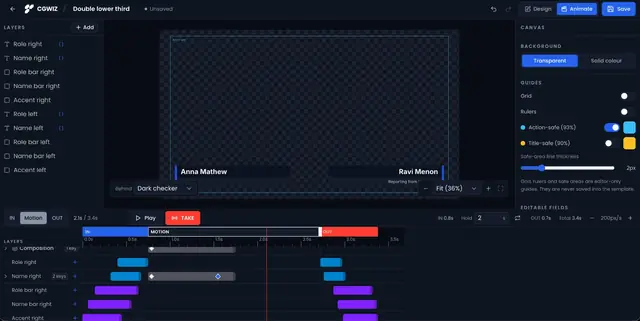
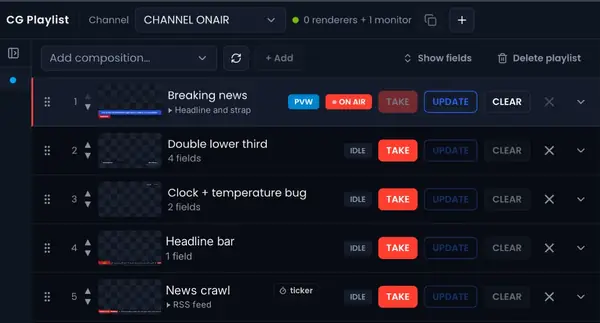
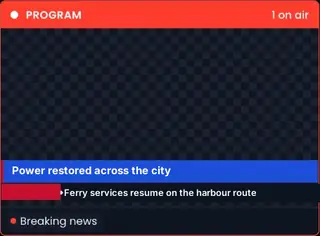

CGWIZ is Tricube’s web platform for live television graphics. Designers build lower thirds, crawls, tickers, bugs and full-frame graphics in a browser editor with animation presets, keyframes and a timeline. Operators run them from CG Playlist, a desk with Preview and Program monitors, a rundown and one-key TAKE, UPDATE and CLEAR.
Graphics stay connected to live data. A cue can read a row from a Google Sheet, a CSV, XML or JSON feed, an RSS feed or a manual table, and on-air text updates when the data changes, without replaying the animation.
Every channel has a Render URL: a transparent page that any browser-source playout system takes as a video layer. It runs on your own playout machine, at the frame rate you set, in progressive or interlaced formats. Tricube Render Engines takes the same output to SDI and NDI.
CGWIZ is built for broadcast teams: separate workspaces, roles from viewer to owner, a server-side ON AIR interlock, and Stream Deck and Companion control.
From the designer to the Program monitor in your PCR.
1Design
Layers, canvas and the IN, motion and OUT timelines, in the browser.
2Operate
Preview and Program monitors, a rundown and one-key TAKE, UPDATE and CLEAR.
3On air
The graphic plays over live video on the Program monitor, through your playout system or downstream keyer or BridgeWIZ.
Generate graphics and more from the assistant you already use. Everything lands in your CGWIZ Designer workspace.
Add the CGWIZ connector in Claude’s connector settings.
Add CGWIZ as a connector in ChatGPT.
Add the CGWIZ MCP server to Claude Code.
Add the CGWIZ MCP server in Cursor’s MCP settings.
Request early accessThe assistant works only in the workspaces your account can open.
It lands in your CGWIZ Designer workspace, ready to check and edit.
Using CGWIZ, create a lower third for tonight’s election special in our channel colours, with editable name and role fields.Build lower thirds, crawls, tickers, bugs and full-frame graphics with animation presets, keyframes and a timeline.
Animation presets, or per-property keyframes with easing curves, for how a graphic enters, moves while live and leaves.
Bind text to a Google Sheet, CSV, XML, RSS or JSON feed or a manual table. On-air text updates without replaying the animation.
A desk with Preview and Program monitors, a rundown and one-key TAKE, UPDATE and CLEAR.
A transparent Render URL for OBS, vMix, CasparCG, TriCaster or any browser source. Tricube Render Engines takes it to SDI and NDI.
Separate workspaces, roles from viewer to owner, an ON AIR interlock and Stream Deck control.
Coming soon
Built for
| Output | HTML5 page with alpha transparency, one Render URL per channel |
|---|---|
| Playout systems | OBS, vMix, CasparCG, TriCaster, any browser source; Tricube Render Engines for SDI and NDI |
| Frame rates | 25 · 29.97 · 30 · 50 · 59.94 · 60 |
| Scan | Progressive or interlaced (interlaced uses the field rate, for example 1080i50) |
| Formats | Any format from SD to UHD; landscape, square, vertical, portrait |
| Images | JPEG, PNG, WebP, GIF (animated), TGA, with alpha |
| Fonts | WOFF2, WOFF, TTF, OTF, Google Fonts library |
| Data sources | Google Sheets, CSV, XML and RSS, JSON, manual table, text file, HTTP push |
| Control | Browser desk, keyboard, Stream Deck via Bitfocus Companion, HTTP |
| Access | Any modern browser; nothing to install for designers or operators |
Every plan includes the editor, animation, tickers, live data and CG Playlist.
1channel
3channels
3channels
Unlimitedchannels
“Layers per channel” means graphics that can be on air at the same time on one channel.
No. Designers and operators work in a browser. The playout machine opens the channel’s Render URL in OBS, vMix or another browser-source system, or in Tricube Render Engines for SDI and NDI.
On your own playout machine, inside your playout software. CGWIZ does not stream video from the cloud.
Any format from SD to UHD, at the frame rate you choose: 25, 29.97, 30, 50, 59.94 or 60, progressive or interlaced.
Yes. Bind fields to a Google Sheet, CSV, XML, RSS or JSON feed, a manual table or a text file. Text on air updates when the data changes.
Nothing goes to air until an operator arms the channel in CG Playlist, and the server enforces that for every control path, including Stream Deck. Roles decide who may design and who may play out.
No. A graphic on air keeps the version it was taken with until the operator takes it again.
Yes, through Bitfocus Companion.
Any language a Google Font or your own font covers. Tickers can travel right to left.